Application Tutorial:
a Restaurant app
Part II
- Introduction
- Take-away
- Derived values
- Growing the business
- Conditional expressions
- Usages and reference sets
- Commands and actions
- Next
Introduction
This is the second part of the application language tutorial that builds a restaurant app. Complete the first part before continuing.
In Part I you wrote a small data model for a restaurant, and generated a web application from it for entering a menu, tables, and orders. Part II adds computation and interaction: derived values, conditional expressions, reference sets, and commands and actions.
Take-away
The restaurant starts a take-away service, which the model has to accommodate.
Orders no longer belong to a table: a take-away order has no table at all.
An order does need to record whether it is a Takeaway order or an In-house order for a table.
So this part of the model:
'Tables': collection ['Table number'] {
	'Table number': text
	'Seatings': number 'chairs'
	'Orders': collection ['Order line'] {
		'Order line': text
		'Item': text -> ^ ^ .'Menu'[]
		'Amount': number 'units'
	}
}
becomes this:
'Tables': collection ['Table number'] {
	'Table number': text
	'Seatings': number 'chairs'
}

'Orders': collection ['Order'] {
	'Order': text
	'Order type': stategroup (
		'Takeaway' { }
		'In-house' {
			'Table': text -> ^ ^ .'Tables'[]
		}
	)
	'Order lines': collection ['Order line'] {
		'Order line': text
		'Item': text -> ^ ^ .'Menu'[]
		'Amount': number 'units'
	}
}
Four things changed:
Ordersmoved one level up, to theroot.- Order lines used to hang directly under a table, which left no way to tell which lines belong to the same order. An order now has its own collection of
Order lines. - A stategroup
Order typewas added, with the statesTakeawayandIn-house. - The state
In-households aTableattribute that references an item ofTables.
Derived values
Customers have to pay, so the app has to compute what an order costs.
Start with the Line total: the cost of a single order line.
A Line total is a derived value: it is not entered by a user, but computed from the Amount and the Selling price:
'Order lines': collection ['Order line'] {
	'Order line': text
	'Item': text -> ^ ^ .'Menu'[]
	'Amount': number 'units'
	'Line total': number 'eurocent' = product (
		.'Amount' as 'units',
		>'Item'.'Selling price'
	)
}
A derived value is written as = <expression> behind its type: Line total is a number 'eurocent', and the expression behind it says how that number comes about — the product of the Amount and the Selling price.
The notation >'Item' follows a reference.
Starting at the order line, it follows the Item reference (declared as -> ^ ^ .'Menu'[]), so >'Item' is the menu item that the order line refers to.
Multiplying an amount by a price multiplies their units as well: units times eurocent gives eurocent.
Alan does not assume such a rule; the model states it.
Add it under 'eurocent' in the numerical-types section, which then reads:
numerical-types
	'eurocent'
		= 'units' * 'eurocent'
		@numerical-type: (
			label: "Euro"
			decimals: 2
		)
	'chairs'
	'units'
= 'units' * 'eurocent' is a product conversion rule, and it is declared under the numerical type of the result.
Its general form is = 'num-type1' * 'num-type2'.
In the expression itself, as 'units' behind .'Amount' names the operand this rule multiplies first, so the compiler can check that the multiplication makes sense.
A division works the same way, with a division conversion rule that uses / instead of *.
NOTE: a future version of the compiler is planned to infer these rules.
A conversion by a constant factor is a singular conversion rule.
The rule is declared under the resulting type, and the expression names the type it starts from with from:
root {
	'Circle diameter': number 'diameter'
	'Circle circumference': number 'circum' = from 'diameter' ( .'Circle diameter' )
}

numerical-types
	'diameter'
	'circum'
		= 'diameter' * 314159265 * 10 ^ -8 // = diameter * pi
Here, circum is derived from diameter by the factor on the last line — pi, written as an integer with a power of ten, because Alan stores whole numbers.
Conversion rules keep the numerical types of derived values correct, and make conversions reusable.
The order needs a total as well:
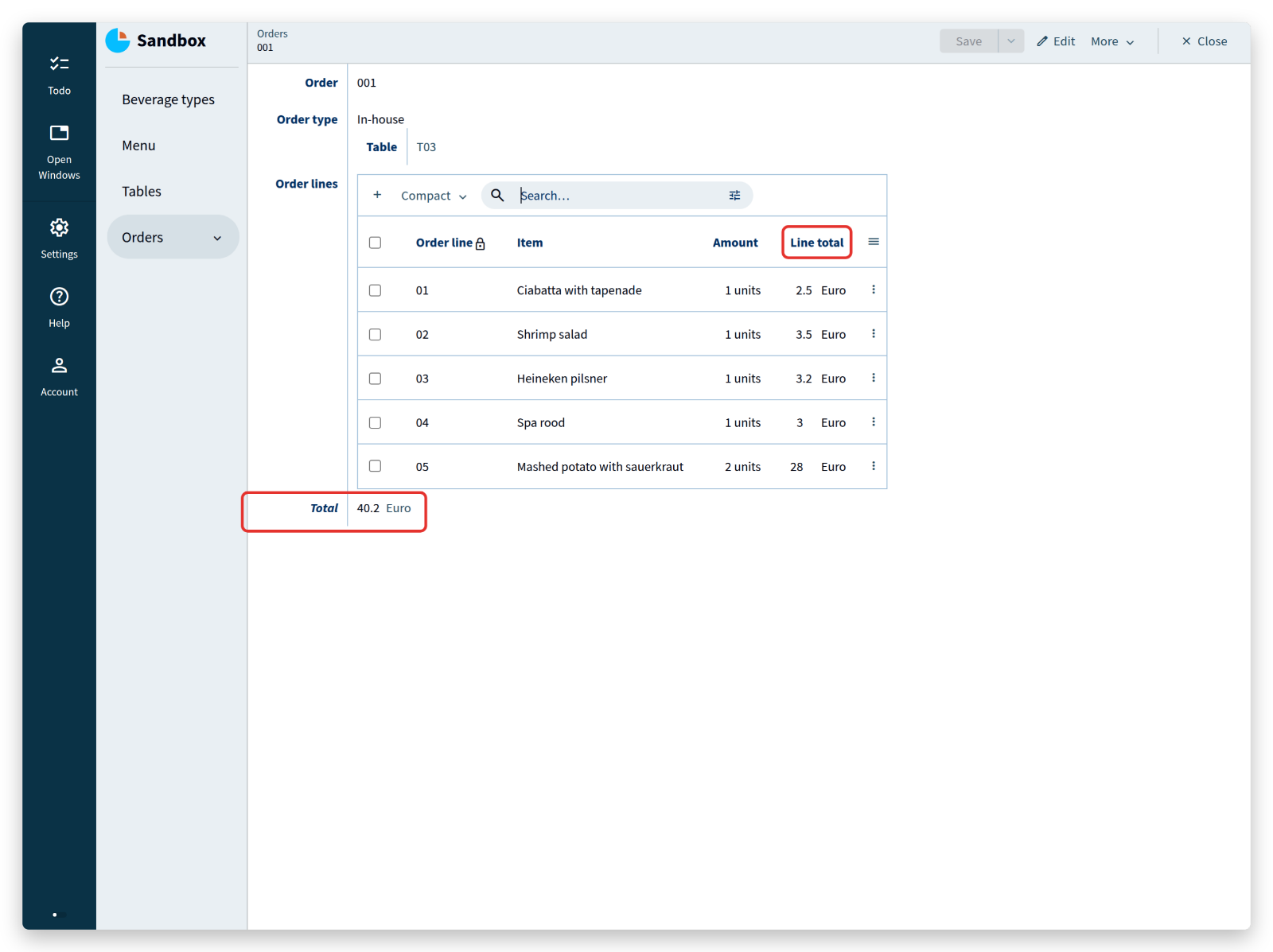
'Total': number 'eurocent' = sum .'Order lines'* .'Line total'
Total is the sum of the Line total of all order lines.
The expression starts with the keyword sum, followed by a path that produces the set of numbers to add up.
The grammar calls that an object set path.
It starts with navigation steps that lead to a collection (.'Order lines'), continues with *, which expands the collection into the set of its nodes, and ends with the value to take from each node (.'Line total').
Where does this line belong in the model? Think about it before you read on — the answer is in the model below.
The whole model now looks like this:
users
	anonymous

interfaces

root {
	'Beverage types': collection ['Beverage type'] {
		'Beverage type': text
	}

	'Menu': collection ['Item name'] {
		'Item name': text
		'Selling price': number 'eurocent'
		'Item type': stategroup (
			'Dish' {
				'Dish type': stategroup (
					'Appetizer' { }
					'Main course' { }
					'Dessert' { }
				)
			}
			'Beverage' {
				'Beverage type': text -> ^ ^ .'Beverage types'[]
			}
		)
	}

	'Tables': collection ['Table number'] {
		'Table number': text
		'Seatings': number 'chairs'
	}

	'Orders': collection ['Order'] {
		'Order': text
		'Order type': stategroup (
			'Takeaway' { }
			'In-house' {
				'Table': text -> ^ ^ .'Tables'[]
			}
		)
		'Order lines': collection ['Order line'] {
			'Order line': text
			'Item': text -> ^ ^ .'Menu'[]
			'Amount': number 'units'
			'Line total': number 'eurocent' = product (
				.'Amount' as 'units',
				>'Item'.'Selling price'
			)
		}
		'Total': number 'eurocent' = sum .'Order lines'* .'Line total' // <-- ;-)
	}
}

numerical-types
	'eurocent'
		= 'units' * 'eurocent'
		@numerical-type: (
			label: "Euro"
			decimals: 2
		)
	'chairs'
	'units'
And in the app:
Operations such as sum work on a set of values and on a list of values.
To sum a list of separate values, put them in parentheses after sum, as with product:
'Sum': number 'units' = sum ( .'value A', .'value B', .'value C', .'value D' )
The documentation lists all operations for deriving numbers:
sum: the sum of a set or list of valuesmin: the minimum of a set or list of valuesmax: the maximum of a set or list of valuesstd: the standard deviation of a set of valuescount: the number of values in a setremainder: the remainder of a division (10 mod 3 = 1)division: the division of two numbersadd: the addition of two numbersdiff 'date': the difference between two relative numbers, such as two dates or two temperatures
A number is absolute when it expresses an amount, and relative when it expresses a position on a scale:
- days: absolute, “28 days”
- date: relative, “28-7-2021”
- years: absolute, “5 years”
- year: relative, “2021”
- degrees: absolute, “21 degrees”
- temperature: relative, “21˚C”
- seconds, minutes, hours: absolute, “2 hours, 35 minutes and 8 seconds” (a duration)
- time of day: relative, “14:35:08”
Numbers are only one kind of derived value; the language derives other types as well, as the next sections show.
<tutorial folder:
./_docs/tutorials/restaurant1/2026.2/step_04a/>
Growing the business
The restaurant is growing, more people work with the app, and the model needs some reorganization. Some data is permanent and should be maintained by management only, and the model can say so.
Put a group Management at the top of the model.
It holds a new collection Discount periods, a VAT percentage, and the existing collections Beverage types and Tables:
'Management': group {
	'Discount periods': collection ['Period'] {
		'Period': text
		'Percentage': number 'percent'
		'Minimal spendings': number 'eurocent'
	}
	'VAT percentage': number 'percent'
	'Beverage types': collection ['Beverage type'] {
		'Beverage type': text
	}
	'Tables': collection ['Table number'] {
		'Table number': text
		'Seatings': number 'chairs'
	}
}
Rebuilding now produces errors: expressions elsewhere in the model still navigate to the old locations, and the compiler cannot find those attributes any more.
Fix each error by adding the missing navigation step, .'Management'.
This is normal Alan work — the compiler points at every place that a structural change affects, which is exactly why such changes are safe to make.
The VAT percentage is used to compute value added tax, and needs a numerical type of its own:
'percent'
The Discount periods hold discounts for different periods, where the discount depends on the amount spent.
Rename the Total of an order to Subtotal, since the actual total will depend on a discount:
'Subtotal': number 'eurocent' = sum .'Order lines'* .'Line total'
<tutorial folder:
./_docs/tutorials/restaurant1/2026.2/step_05/>
Conditional expressions
Add a stategroup Discount applicable to Orders.
The numerical-types section needs the new numerical type fraction, a product conversion rule for it, and a singular conversion rule percent:
'Discount applicable': stategroup (
	'Yes' {
		'Discount period': text -> ^ ^ .'Management'.'Discount periods'[]
		'Discount': number 'eurocent' = switch ^ .'Subtotal' compare ( >'Discount period'.'Minimal spendings' ) (
			| <  => 0
			| >= => product ( from 'percent' ( >'Discount period'.'Percentage' ) as 'fraction', ^ .'Subtotal' )
		)
		'Total': number 'eurocent' = sum ( ^ .'Subtotal', - .'Discount' )
	}
	'No' { }
)
...
numerical-types
	'eurocent'
		= 'units' * 'eurocent'
		= 'fraction' * 'eurocent'
		@numerical-type: (
			label: "Euro"
			decimals: 2
		)
	'chairs'
	'units'
	'percent'
	'fraction'
		= 'percent' / 1 * 10 ^ 2
With this extension, a discount applies when a user selects a Discount period from the collection added earlier.
Selecting ‘Summer holiday’, for example, gives 3% discount on amounts over €35.
When Discount applicable is Yes and a Discount period is selected, the app computes the Discount as follows:
- compare the
Subtotalwith theMinimal spendingsof the selectedDiscount period, - if the
Subtotalis smaller, theDiscountis 0, - otherwise the
Percentageof that period is converted frompercenttofraction(3% becomes 0.03), and theDiscountis theproductof that fraction and theSubtotal.
The Total is then the Subtotal minus the Discount, expressed as a sum with a sign inversion (-).
The switch expression for the Discount switches on the result of a compare of two numbers.
A case matches one of these results:
- ‘greater than’ (
>) - ‘greater than or equal to’ (
>=) - ‘less than’ (
<) - ‘less than or equal to’ (
<=) - ‘equal to’ (
==) - ‘less than or greater than’ (
<>)
Cases may not overlap, so a switch cannot match both < and <=.
Enter an order in the app:
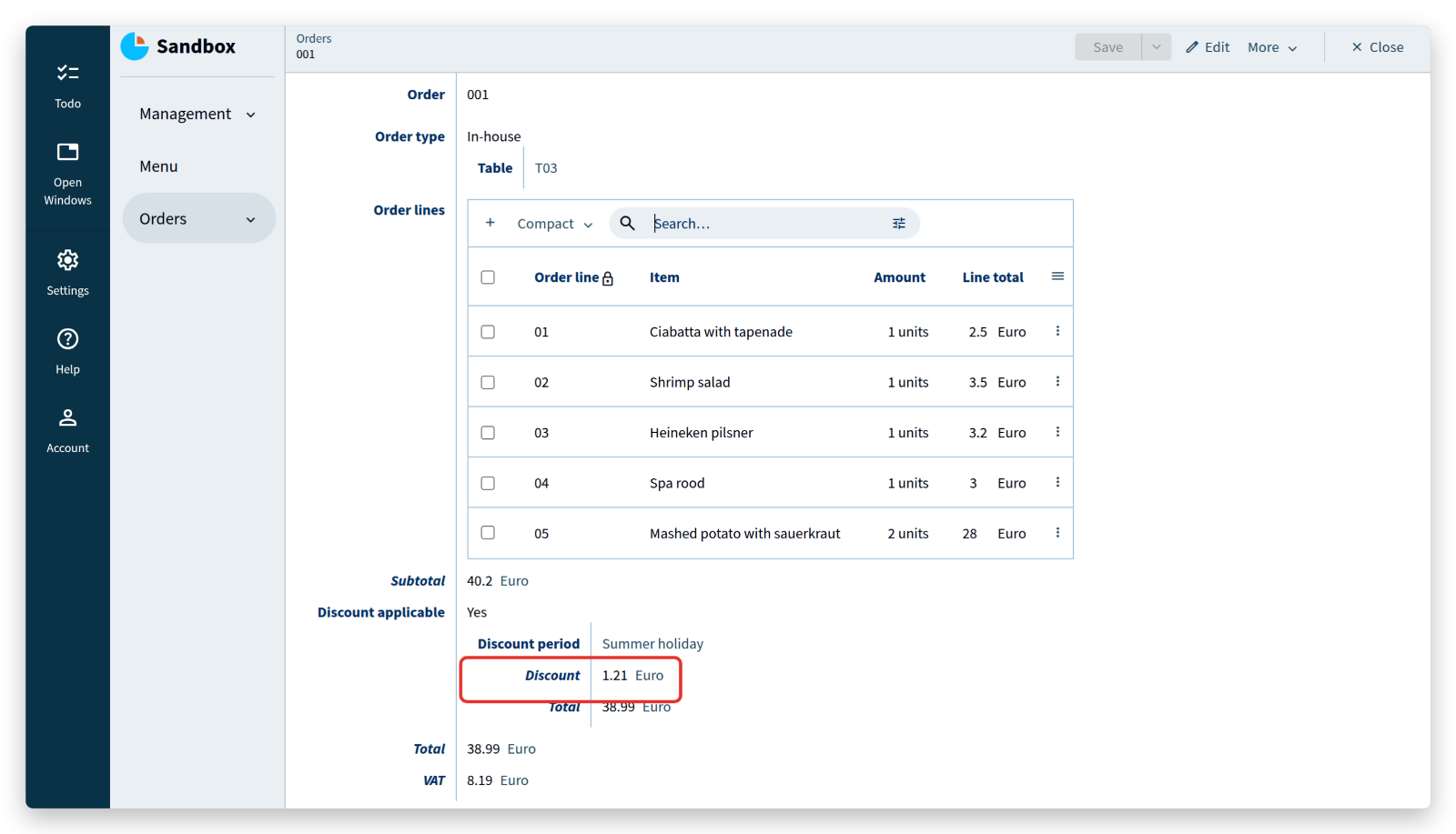 An order with a subtotal of €40.20 gets 3% discount, because it exceeds the €35 that the summer holiday period requires.
Next, compute the tax (VAT), which is a percentage of the total.
The total depends on whether a discount applied, so the expression has to switch on the state of Discount applicable before it can use the total:
'Total': number 'eurocent' = switch .'Discount applicable' (
	|'Yes' as $'discount' => $'discount'.'Total'
	|'No'  => .'Subtotal'
)
'VAT': number 'eurocent' = product ( from 'percent' ( ^ .'Management'.'VAT percentage' ) as 'fraction', .'Total' )
In the case of state Yes, the expression uses as $'discount'.
That stores the Yes node under the name $'discount', so that the rest of the expression can refer to it as $'discount'.'Total'.
Such a name is called a named object.
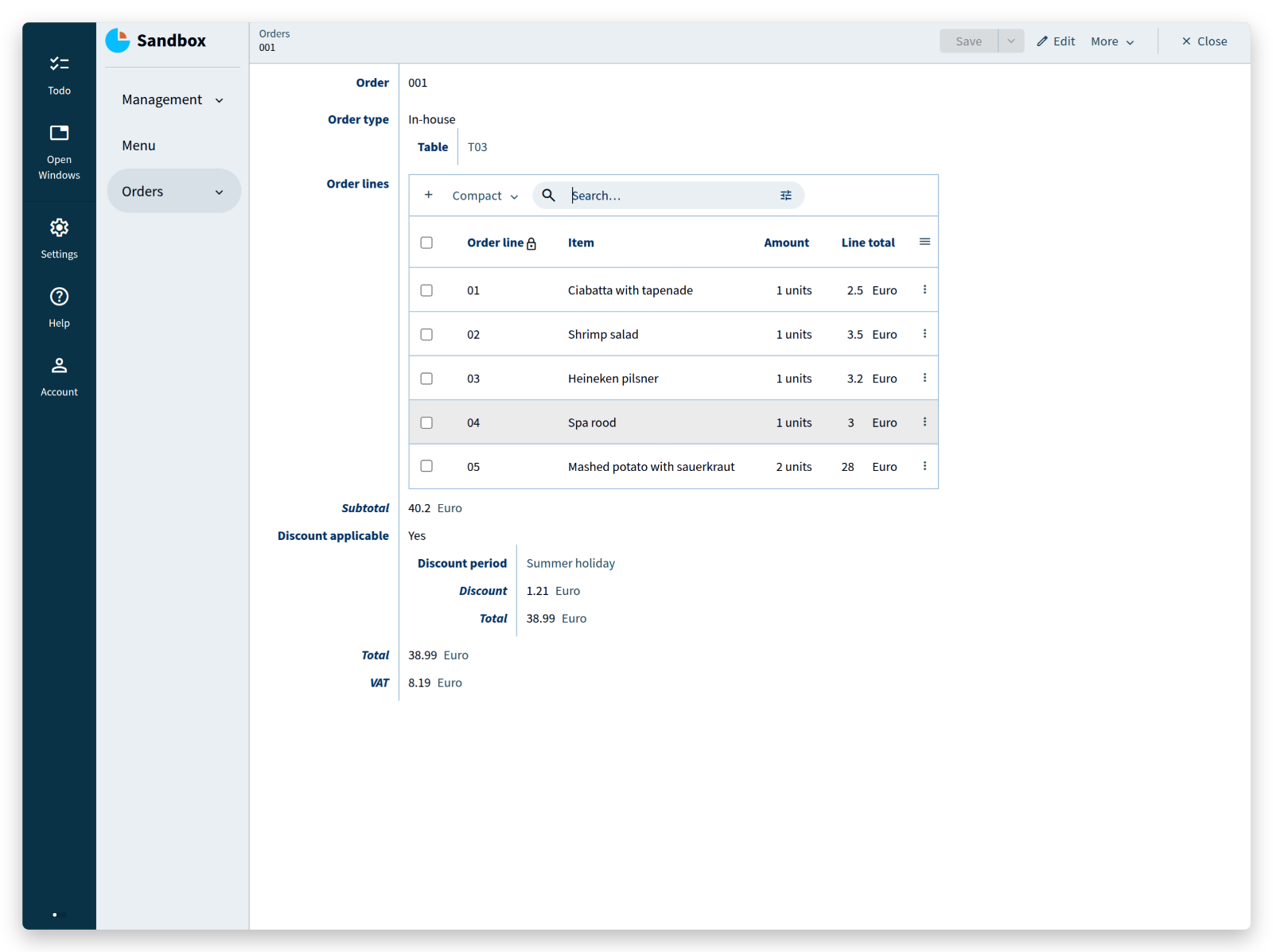
The result:
Every property type in the application language can be derived, not just numbers: text values, file values, references, stategroup states, and even collections.
The documentation has examples of each.
<tutorial folder:
./_docs/tutorials/restaurant1/2026.2/step_06/>
Usages and reference sets
A reference can be followed in both directions, but the app shows only one direction by default: an In-house order shows its Table.
The opposite direction — which orders refer to a particular table — is called a usage.
First place a new order.
Select Orders in the left column and click the + button above the table:
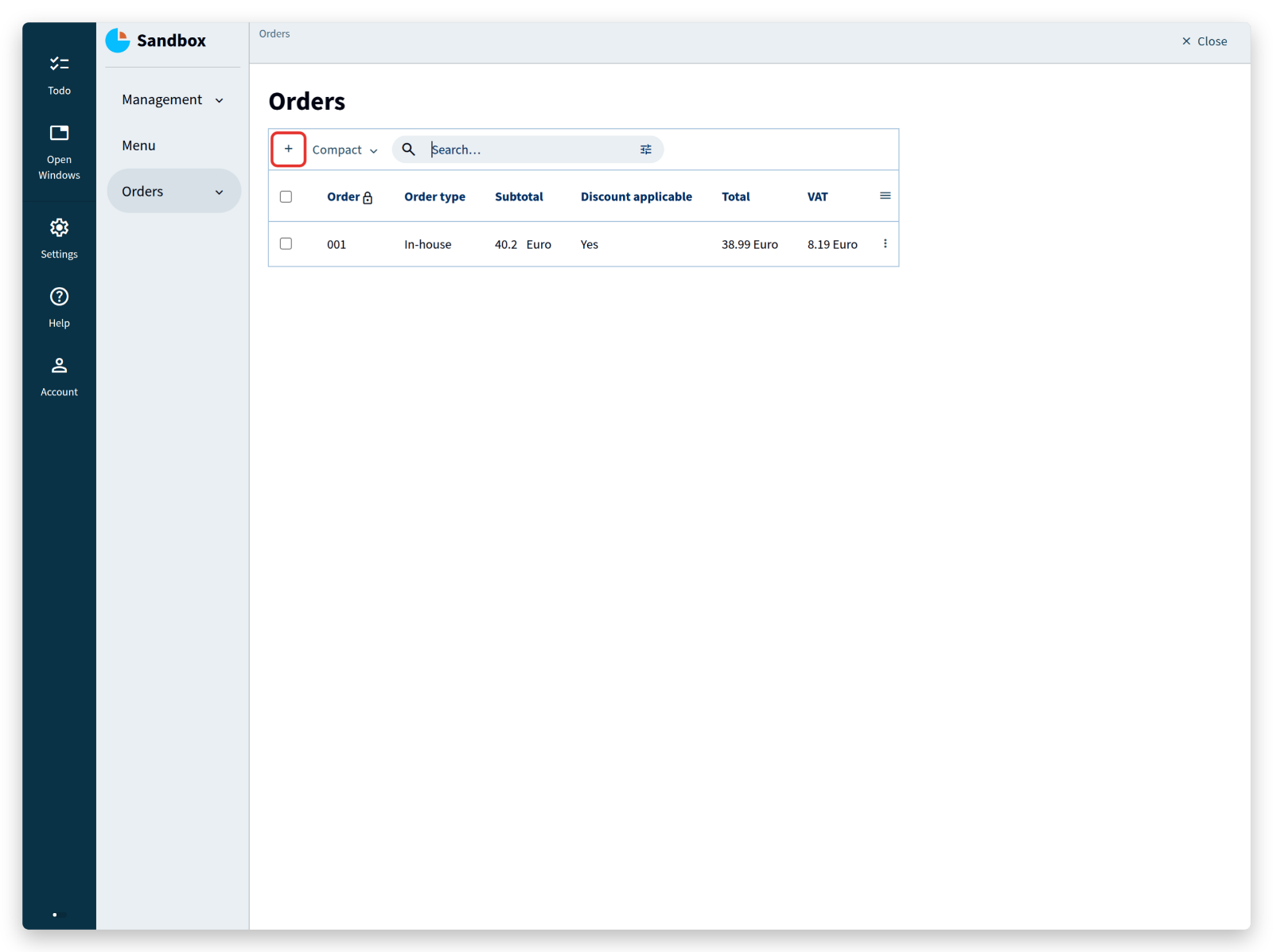
Enter an order number, choose In-house, select a table, and add a few order lines:
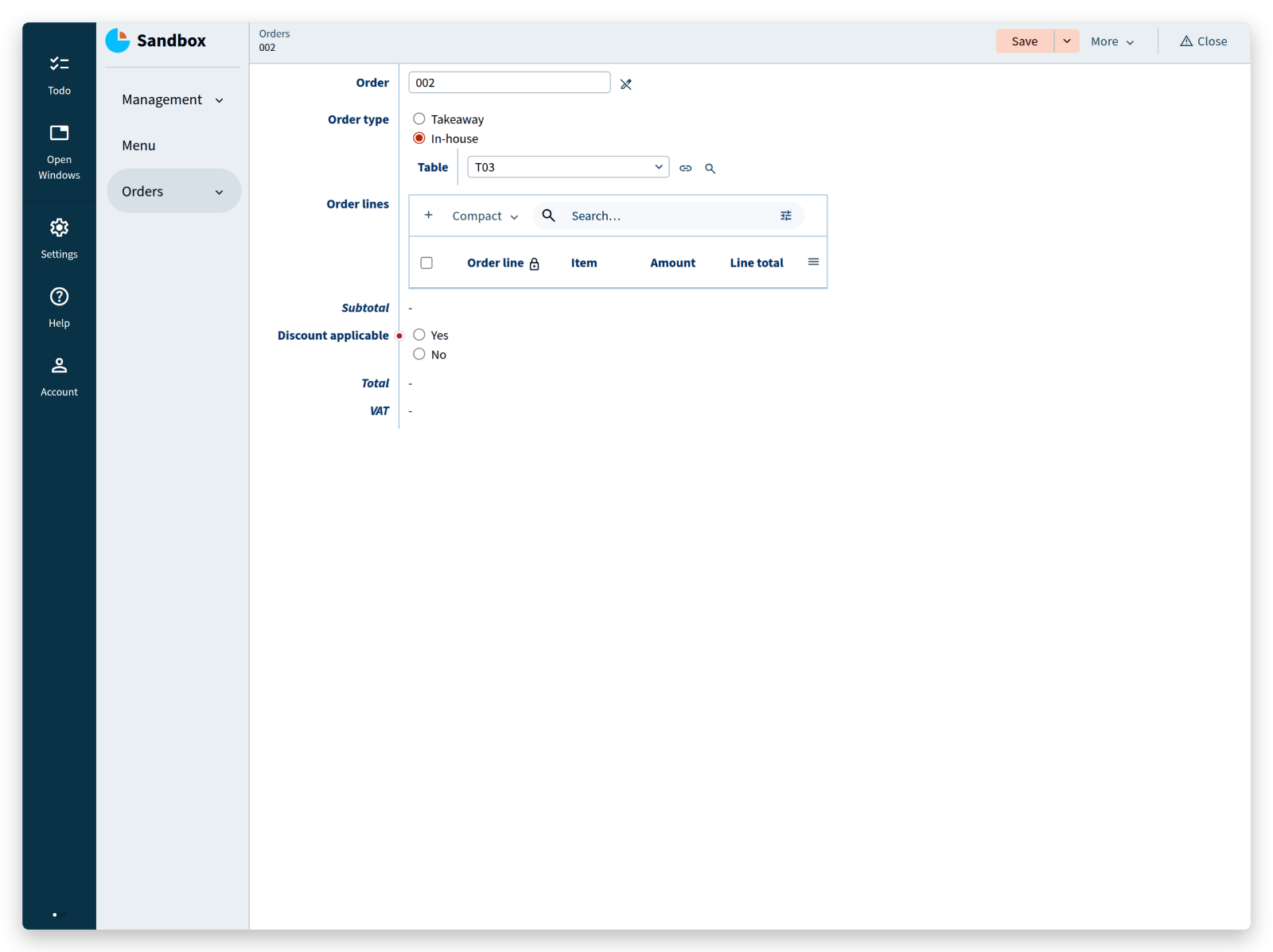
Click Save.
Open the table you selected (under Management, Tables) and its properties show only Table number and Seatings.
The app does know which orders refer to this table, but it hides usages by default.
To see them, click Account, open UI settings, and set Advanced features to Yes. A Usages tab now appears for every reference, without any change to the model. Return to the table and open Usages to see the orders that refer to it.
Usages are a debugging aid.
To show inverse references among the properties of a table, and to compute with them, the model needs a reference set: an attribute that holds all orders whose Table reference points to this table.
Add the reference set and two derivations that use it:
'Tables': collection ['Table number'] {
	'Table number': text
	'Seatings': number 'chairs'
	'Orders': reference-set -> downstream ^ ^ .'Orders'* .'Order type'?'In-house' = inverse >'Table'
	'Number of orders': number 'units' = count <'Orders'*
	'Total order value': number 'eurocent' = sum <'Orders'* ^ .'Total'
}
Build, deploy, and open the table you used earlier (‘T03’ in this example):
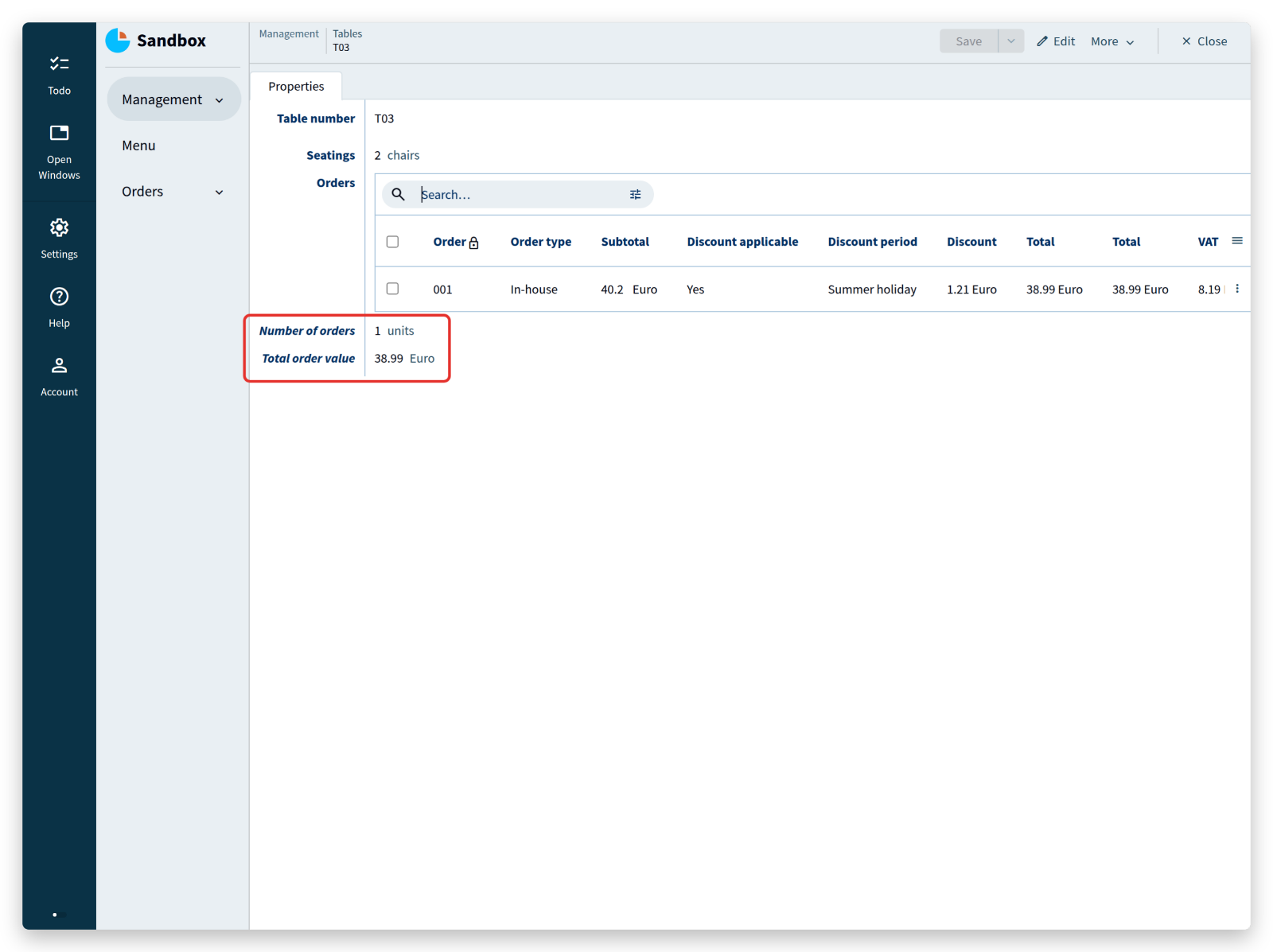
The Orders reference set shows that order ‘001’ uses table ‘T03’.
Below it are the number of orders placed at that table and their total order value — statistics that could inform how the tables are arranged.
Click the order to jump to it and its order lines:
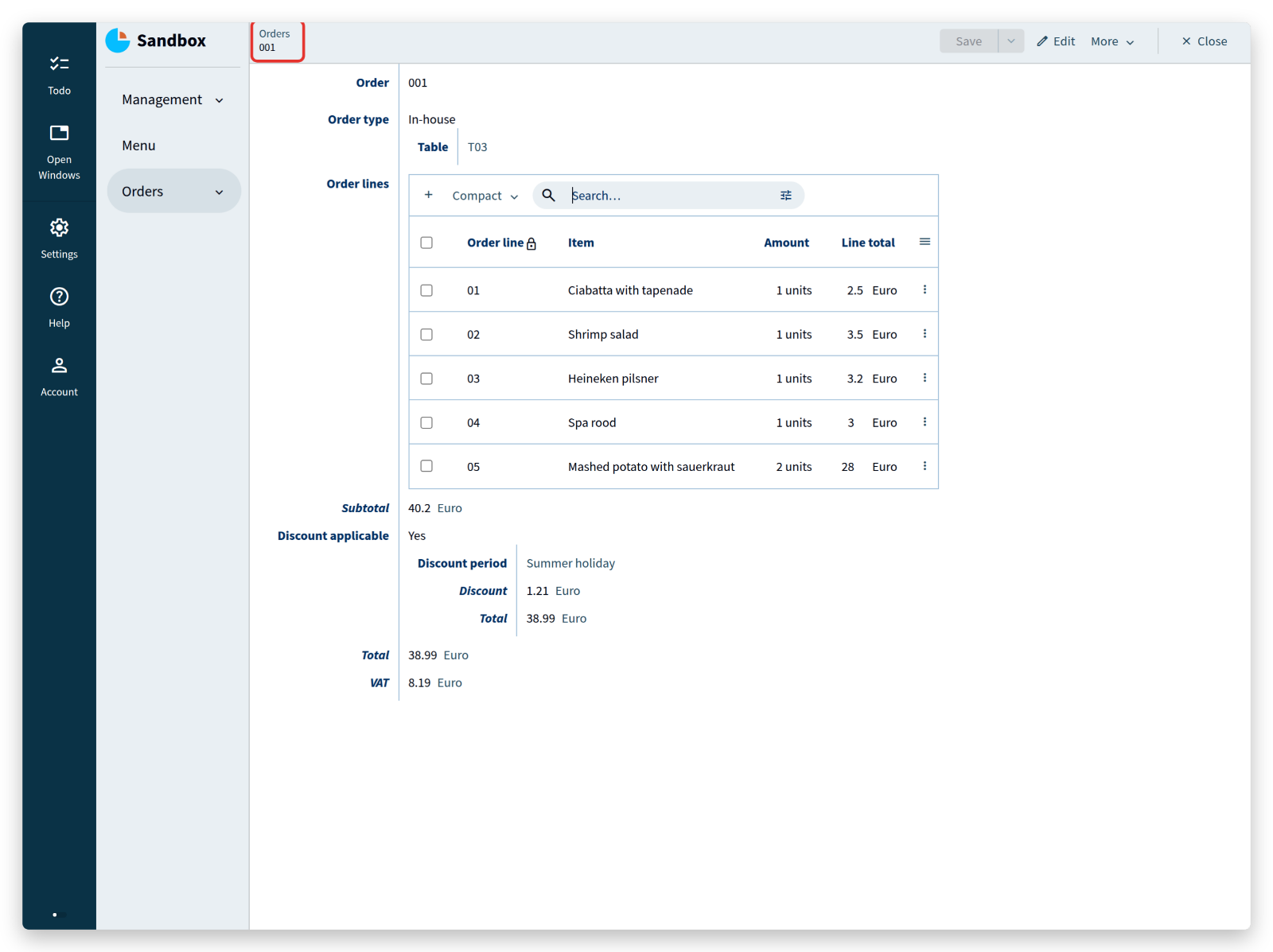
The reference set uses the keyword downstream before its navigation path.
downstream states that the attribute points at nodes that are defined later in the model, which is normally not allowed: a reference to an attribute defined later in the model requires it too.
Well designed models rarely need downstream outside reference sets.
When the compiler demands it elsewhere, reordering the attributes usually removes the need; if it does not, the model probably contains a dependency worth reconsidering.
The navigation path uses * where a reference attribute uses [], because several orders can refer to the same table: the reference set holds all of them.
The path ends by taking the inverse of the Table reference found under In-house.
<tutorial folder:
./_docs/tutorials/restaurant1/2026.2/step_06a/>
Commands and actions
Alan applications are often connected to other systems that send them information.
Suppose the restaurant app has to accept orders from a third-party ordering app.
The two systems agree on an Alan interface — a file that looks a lot like an application model — which declares the commands the other app may send, such as Place new order.
The restaurant app has to implement that command, and it does so in the application language.
NOTE: the Alan interface language is beyond the scope of this tutorial.
If a tutorial about the interface language and connecting applications would help you, say so on the forum.
A second reason for commands is the user interface itself: a screen that works on a mobile device needs buttons that perform an operation in one click, and some tasks consist of several operations that a user should perform as one step.
For that, Alan has actions.
Commands and actions are expressed in almost the same way. The difference is where they run: a command runs on the server, an action runs on the client, in the browser. Which one fits depends on the use case, as described above.
Here is the implementation of Place new order:
'Place new order': command {
	'Provide an order number': text
	'Where is the meal consumed?': stategroup (
		'Outside of restaurant' { }
		'At the restaurant' {
			'Where is the customer seated?': text -> ^ ^ .'Management'.'Tables'[]
		}
	)
	'Order lines': collection ['Provide an order line number'] {
		'Provide an order line number': text
		'Item to be consumed': text -> ^ ^ .'Menu'[]
		'Amount of this item': number 'units'
	}
} as $'param' => update .'Orders' = create (
	'Order' = $'param'.'Provide an order number'
	'Order type' = switch $'param'.'Where is the meal consumed?' (
		|'Outside of restaurant' => create 'Takeaway' ( )
		|'At the restaurant'     as $ => create 'In-house' (
			'Table' = $ .'Where is the customer seated?'
		)
	)
	'Order lines' = walk $'param'.'Order lines'* as $ (
		create (
			'Order line' = $ .'Provide an order line number'
			'Item' = $ .'Item to be consumed'
			'Amount' = $ .'Amount of this item'
		)
	)
	'Discount applicable' = create 'No' ( )
)
That is a lot at once, so look at the result first.
Add the code to the root type, at the bottom of the model, build the app, and open it in the browser.
A button ‘Place new order…’ appears in the left column:
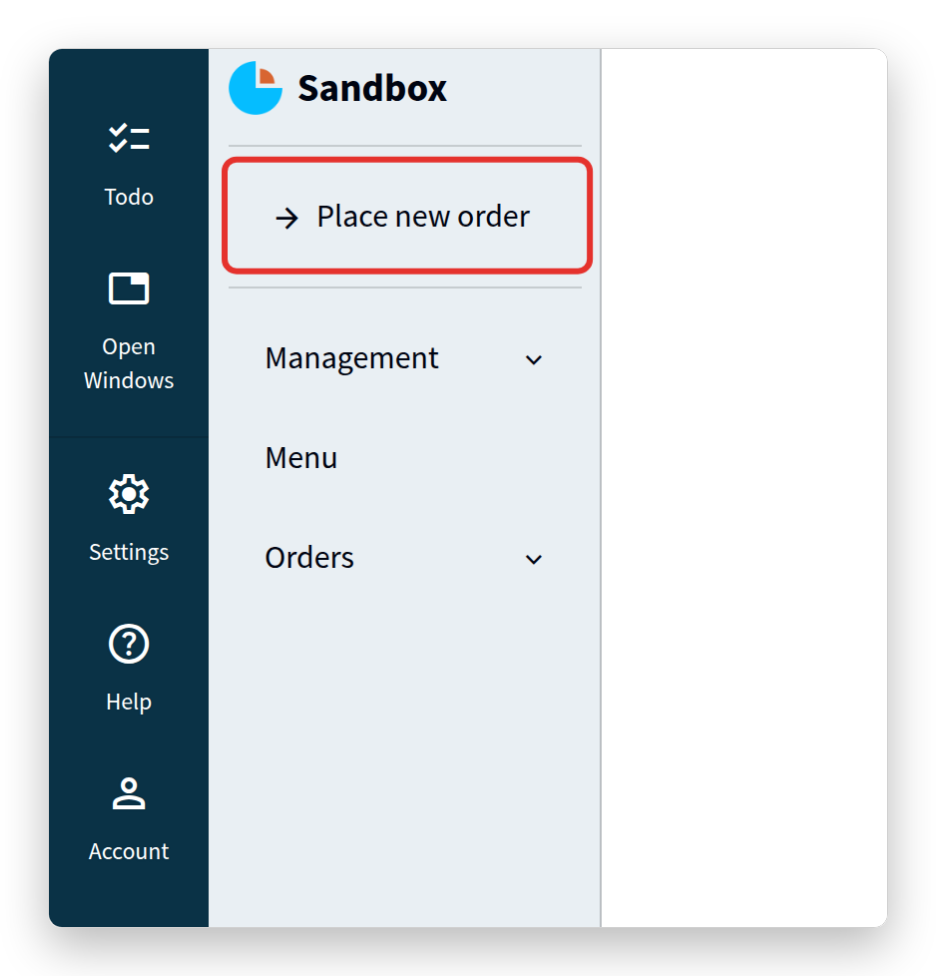
The label of the button is the name of the command, Place new order.
Click it and fill in the form:
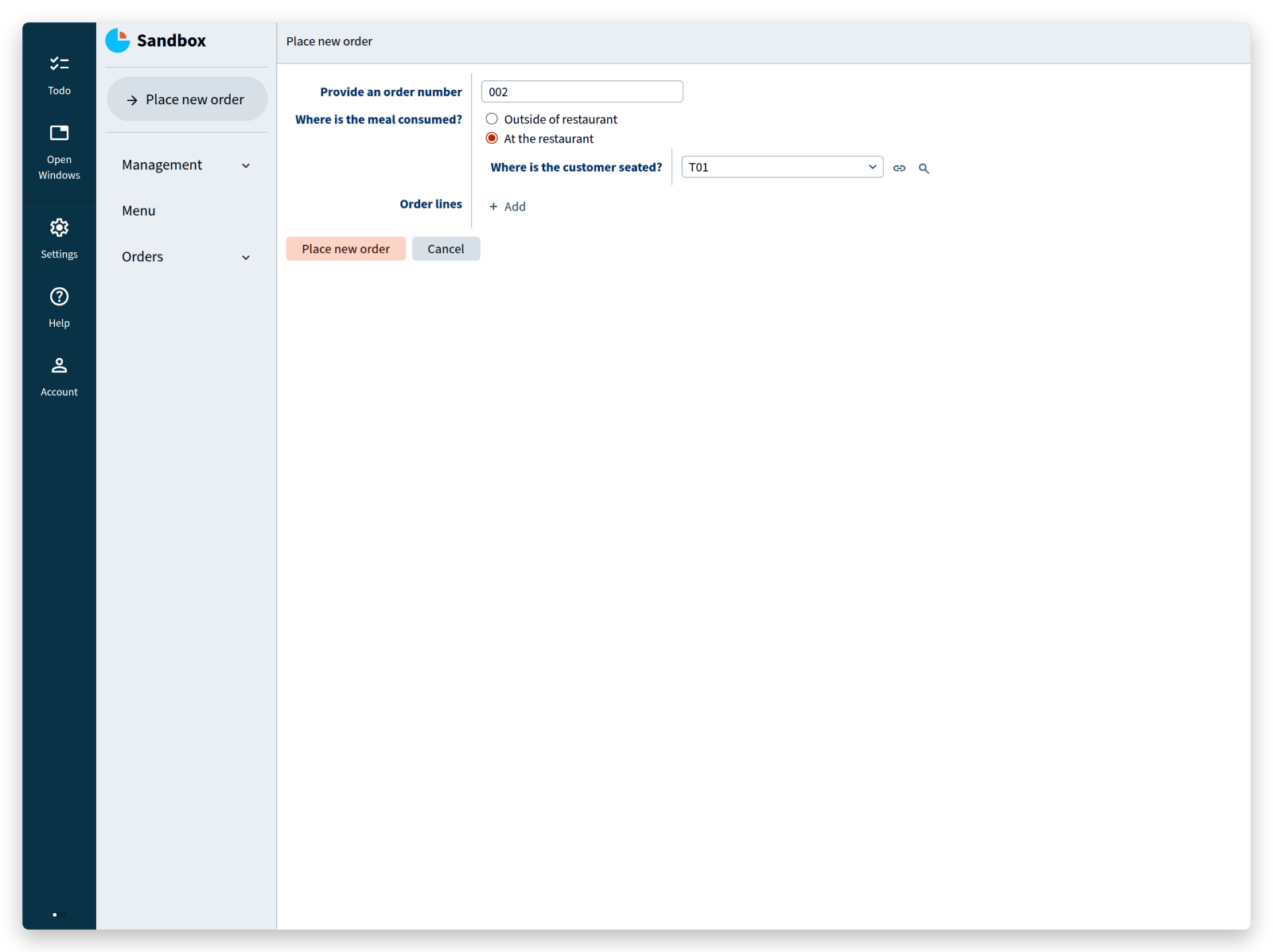
Click Place new order below the form, then Cancel to close the form for the next order.
Go to Orders and open the order that was just created:
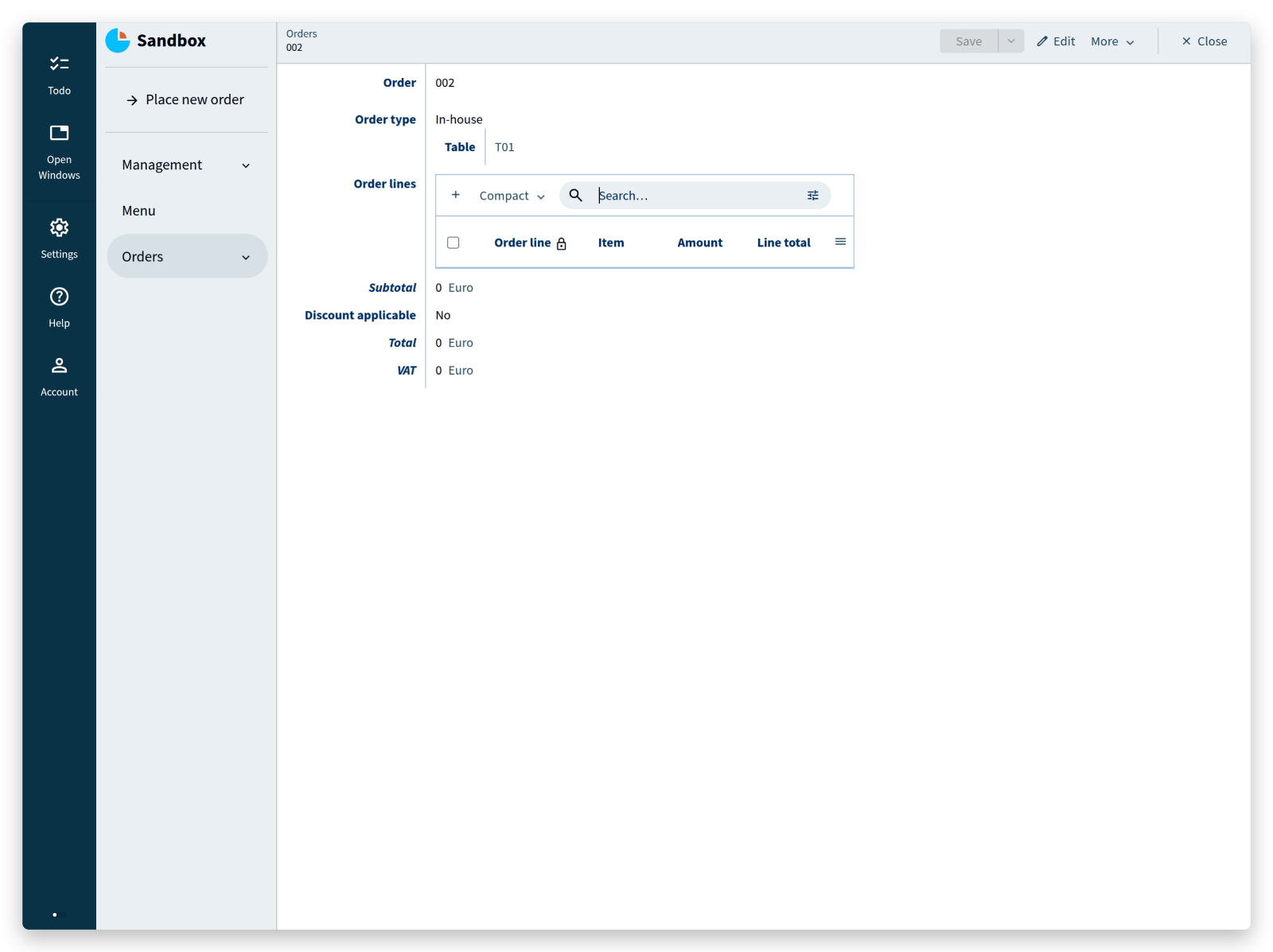
Filling in the form added an order to the Orders collection.
The answer ‘At the restaurant’ to the question ‘Where is the meal consumed?’ became the state In-house of the stategroup Order type.
Now to the code. The first part of a command looks like a data model, and that is what it is: the parameters of a command are described by a small data model of their own:
'Place new order': command {
	'Provide an order number': text
	'Where is the meal consumed?': stategroup (
		'Outside of restaurant' { }
		'At the restaurant' {
			'Where is the customer seated?': text -> ^ ^ .'Management'.'Tables'[]
		}
	)
	'Order lines': collection ['Provide an order line number'] {
		'Provide an order line number': text
		'Item to be consumed': text -> ^ ^ .'Menu'[]
		'Amount of this item': number 'units'
	}
} as $'param' ...
Inside these command parameters, references to the main model are expressed as usual, for example -> ^ ^ .'Management'.'Tables'[].
Navigation inside the parameter node works exactly as it does anywhere else in the model: every step is evaluated relative to the position of the expression.
A command on a collection has access to that collection.
A command Remove order line on Orders, for example, gives every order a button, and its Line parameter can only refer to the order lines of the order it is called on:
'Orders': collection ['Order'] {
	'Order': text
	'Order lines': collection ['Order line'] {
		'Order line': text
		'Item': text -> ^ ^ .'Menu'[]
		'Amount': number 'units'
		'Line total': number 'eurocent' = product ( .'Amount' as 'units', >'Item'.'Selling price' )
	}
	'Remove order line': command {
		'Line': text -> ^ .'Order lines'[]
	} as $'param' => update .'Order lines' = delete $'param'>'Line'
}
The parameter node is named with as $'param', which makes the properties inside the parameter node available as $'param'.'...' in the rest of the command.
After the parameters comes the operation to perform, such as ... => update .'Orders' ....
Read the double arrow as ‘do’.
The keyword update states that an attribute is updated, and the path that follows resolves to the attribute in question: the collection Orders.
Instead of update, a command can use switch, ignore, walk, execute, and external; Part III uses several of these.
update is the one needed here.
The implementation ends with ... = create ( ... ): the update is (=) the creation (create) of a node.
create fails, and rejects the whole command, when the collection already contains a node with the given key.
ensure is the alternative: it creates the node when it does not exist, and otherwise overwrites the values as the model specifies.
Between the parentheses of create stands how the new order is built from the parameters:
'Order' = $'param'.'Provide an order number'
'Order type' = switch $'param'.'Where is the meal consumed?' (
	|'Outside of restaurant' => create 'Takeaway' ( )
	|'At the restaurant'     as $ => create 'In-house' (
		'Table' = $ .'Where is the customer seated?'
	)
)
'Order lines' = walk $'param'.'Order lines'* as $ (
	create (
		'Order line' = $ .'Provide an order line number'
		'Item' = $ .'Item to be consumed'
		'Amount' = $ .'Amount of this item'
	)
)
The attribute Order, for instance, takes whatever the caller provided for Provide an order number.
The named object $'param' refers to the parameter node — the data that conforms to the small model above — and is used for each value taken from it.
<tutorial folder:
./_docs/tutorials/restaurant1/2026.2/step_06b/>
Next
Part II covered computation over the data and the first way to change data from a button: derived values, conditional expressions, reference sets, and commands.
Part III uses these to model the processes of the restaurant: order and line statuses that move forward step by step, references that reach across the model, and products assembled from other products.
The documentation describes every feature of the language in full, and questions are welcome on the forum.