Migrating Alan application data
- Introduction
- Starting with an empty dataset
- Carrying data over
- The migration language
- Keeping a migration up to date
- Generating a migration
Introduction
The data of an Alan application always matches its model.
That is what makes the app dependable — and it is also what makes a model change interesting: as soon as application.alan changes, the data of the running app no longer matches it.
A migration bridges that gap. It is a file that says, for every piece of data the new model expects, where that value comes from: copied from the running app, converted, or created new. The compiler checks it against both models, so a deployment either carries the data over completely or does not happen at all.
Every deployment therefore starts from a dataset, and there are two ways to get one:
- empty — start with no data at all, or with data written by hand. This is what a first deployment uses.
- migrate — take the data of the running app into the new version of the model.
This guide covers both, and the language migrations are written in. It assumes the project layout of the online Alan IDE, as described in the IDE tutorial.
Returning after a while? Since platform version 2026.1 a migration is written in the processor language of the Alan connector. The language changed completely: no typed declarations, no map, and no error annotations between <! and !>.
Starting with an empty dataset
Alan Deploy asks which data source the deployment should use.
A first deployment has nothing to migrate from, so pick empty:
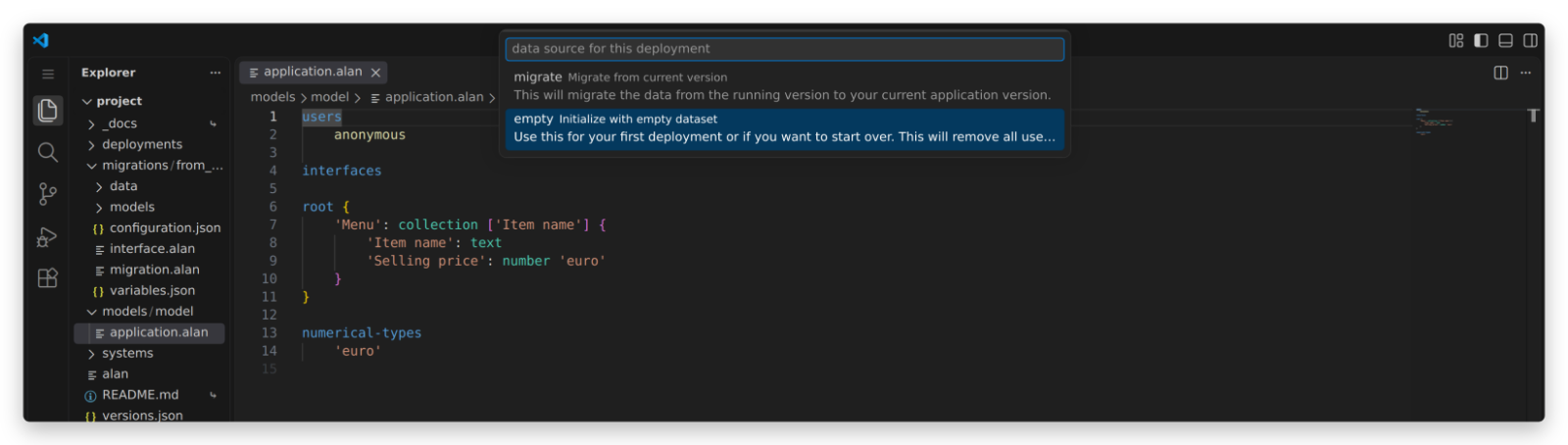
That deployment creates the folder migrations/from_empty:
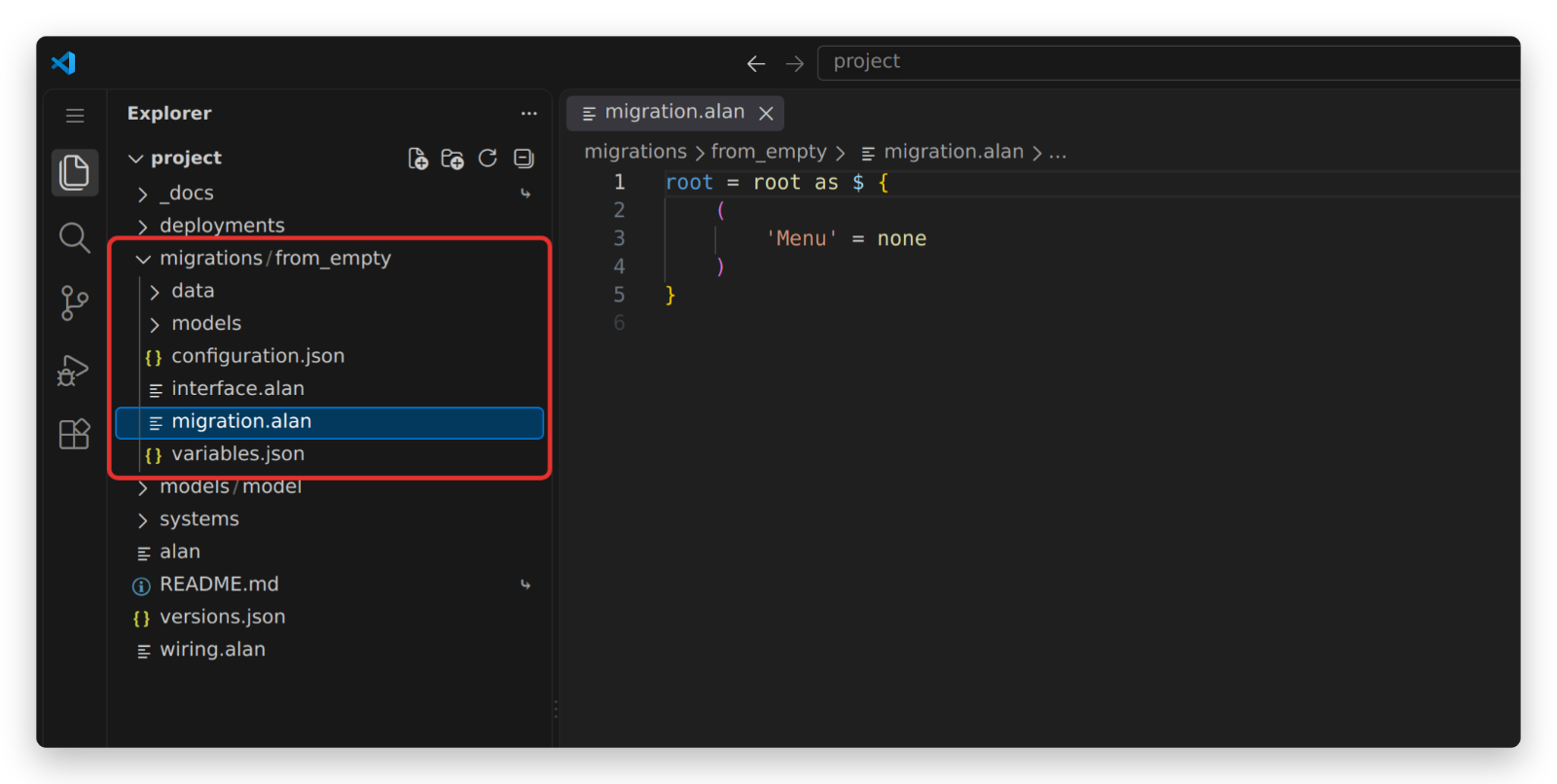
The folder is a complete migration project:
migration.alansays where the data of the new dataset comes from. This is the file you read and edit.models/source/application.alanis the model of the source dataset — forfrom_emptyan empty model (root { }).models/target/application.alan.linkpoints at your ownmodels/model/application.alan.configuration.json,variables.jsonandinterface.alanare fixed; you never edit them.data/is for auxiliary data files, and starts out empty.
Since there is no source data, the generated migration.alan sets every collection to none, the empty collection:
root = root as $ {
	(
		'Menu' = none
	)
}
To start the app with data instead, replace those none expressions with create entries.
This migration gives the Menu of the restaurant tutorial three items:
root = root as $ {
	(
		'Menu' = {
			create (
				'Item name' = "Shrimp salad"
				'Selling price' = 4
			)
			create (
				'Item name' = "Tomato soup"
				'Selling price' = 5
			)
			create (
				'Item name' = "Orange juice"
				'Selling price' = 5
			)
		}
	)
}
One thing to watch: migrations/from_empty is regenerated on every deployment with the empty option, so anything you write there is overwritten.
Keep hand-written initial data somewhere else and copy it in when you need it — which is exactly what the restaurant tutorial does with the migration.alan files in its _docs folder.
Carrying data over
Once an app is running, a deployment can take its data along. Change the model, build, and choose migrate:
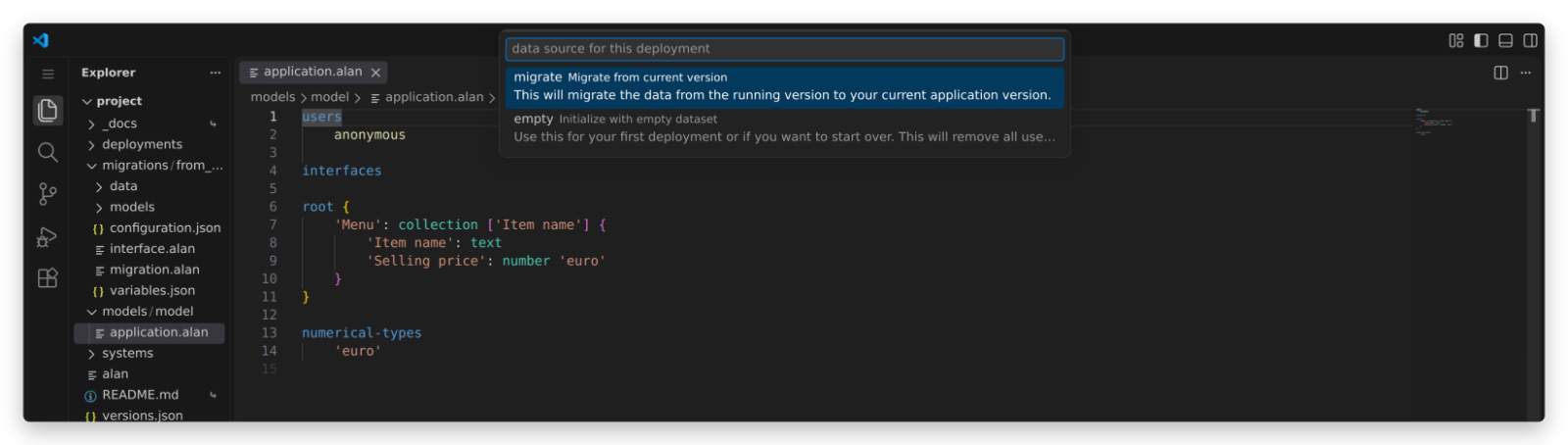
The first time, this creates migrations/from_release.
Unlike from_empty, that folder is generated only once: its migration.alan is yours to maintain and survives every following deployment.
models/source/application.alan in that folder is the model of the deployed app, and the IDE refreshes it at every migrate deployment.
Do not edit it — it describes what the running app holds, which is not yours to decide.
(If you do need a source model of your own, for instance to read a derived value that the deployed model computes, copy the whole from_release folder under a different name and edit the copy.)
The migration language
A migration.alan file gives an expression for every base data property of the target model.
Derived values are not migrated: the app recomputes those from the data itself.
The language is the processor language of the Alan connector; its grammar lists every operation.
The rest of this section is what a typical application needs.
The example below migrates the first step of the restaurant tutorial — a Menu whose Selling price is in whole euros — to the second step, where the price is in eurocents and every item has an Item type:
root = root as $ {
	(
		'Menu' = walk $ .'Menu' as $ => {
			create (
				'Item name' = $ .'Item name'
				'Selling price' = product ( $ .'Selling price' , 100 )
				'Item type' = create 'Dish' (
					'Dish type' = create 'Main course' ( )
				)
			)
		}
	)
}
The shape of a migration. It starts with root = root as $ {.
The $ is the source: the data of the running app, conforming to models/source/application.alan.
Braces { ... } hold a block, and the parentheses ( ... ) inside a block hold the properties of one node of the target model, each with an expression for its value.
Copying values. $ .'Item name' reads a property of the current source node.
Text and number values can be copied like that whenever their type did not change, and a reference is migrated as the text of the key it points at, so 'Item' = $ .'Item' works for a reference too.
Collections. Walk the source collection and create one target entry per source entry:
'Menu' = walk $ .'Menu' as $ => {
	create (
		'Item name' = $ .'Item name'
		'Selling price' = product ( $ .'Selling price' , 100 )
		'Item type' = create 'Dish' (
			'Dish type' = create 'Main course' ( )
		)
	)
}
Inside the walk, $ is the current source entry, so $ .'Item name' now reads from that entry.
A collection without a source is written as a block of create entries, as in the from_empty example above, or as none when it should start empty.
Stategroups. Switch on the source stategroup and create the matching target state in every case:
'Cargo' = switch $ .'Cargo' (
	|'Container' as $ => {
		create 'Container' (
			'Slots' = $ .'Slots'
		)
	}
	|'Bulk' => {
		create 'Bulk' ( )
	}
)
Each case binds $ to the state’s node with as $, which is how 'Slots' above reads a property that only exists in that state.
A stategroup that is new in the target model has nothing to switch on, so create a fixed state:
'Item type' = create 'Dish' (
	'Dish type' = create 'Main course' ( )
)
Groups. A group is a node, so it is a block with parentheses in it:
'Fleet' = {
	(
		'Name' = $ .'Fleet name'
		'Default rate' = $ .'Default rate'
	)
}
Numbers. A number is migrated as an integer in the unit of the target numerical type.
When that unit changes, convert the value with product or division — the language has no * and / operators.
From euros to eurocents:
'Selling price' = product ( $ .'Selling price' , 100 )
Literals. Text goes between double quotes ("Example"), a number is a plain integer (2042), and none is the empty collection.
Reaching data further up. Inside a walk or a switch, $ is the innermost source node, so properties higher up in the source are out of reach.
Give a node a name with let, and use that name wherever you need it, however deep:
let $'source' = $

(
...
'Rate' = $'source' .'Default rate'
Here every charter takes the fleet-wide Default rate from the root of the source, while $ inside the walk still refers to the charter being migrated.
Keeping a migration up to date
from_release/migration.alan has to describe a source for every base data property in your model.
Change the model and deploy with migrate, and the migration is compiled against the new target model: the deployment fails until every new or changed property has a valid expression.
That failure is the feature — it is the platform refusing to put data into an app that does not fit it.
A generated migration (see Generating a migration) is a starting point, not a finished one: it assumes the source model has the same structure as the target and copies everything. For the model change of the previous section, the generator produces:
root = root as $ {
	(
		'Menu' = walk $ .'Menu' as $ => {
			create (
				'Item name' = $ .'Item name'
				'Selling price' = $ .'Selling price'
				'Item type' = switch $ .'Item type' (
					|'Dish' as $ => {
						create 'Dish' (
							'Dish type' = switch $ .'Dish type' (
								|'Appetizer' as $ => {
									create 'Appetizer' ( )
								}
								|'Main course' as $ => {
									create 'Main course' ( )
								}
								|'Dessert' as $ => {
									create 'Dessert' ( )
								}
							)
						)
					}
					|'Beverage' as $ => {
						create 'Beverage' (
							'Beverage type' = switch $ .'Beverage type' (
								|'Juice' as $ => {
									create 'Juice' ( )
								}
								|'Soft drink' as $ => {
									create 'Soft drink' ( )
								}
								|'Cocktail' as $ => {
									create 'Cocktail' ( )
								}
								|'Beer' as $ => {
									create 'Beer' ( )
								}
								|'Wine' as $ => {
									create 'Wine' ( )
								}
								|'Coffee & tea' as $ => {
									create 'Coffee & tea' ( )
								}
							)
						)
					}
				)
			)
		}
	)
}
Compiling that fails, because the source model has no Item type yet:
‘property’
Item typewas not found in ‘attributes’. Existing ‘attributes’:Item name,Selling price
Two edits fix it, both shown in the complete migration above: the switch on $ .'Item type' becomes a create of a fixed state, and Selling price gets its conversion to eurocents.
A second example. For an application.alan with
root {
	'App Name': text
	'App Description': text
	'Users': collection ['User'] {
		'User': text
	}
	'Year': number 'year'
}
a valid migration from a model that only had an Original App Name is:
root = root as $ {
	(
		'App Name' = $ .'Original App Name'
		'App Description' = "Example app for migrations."
		'Users' = none
		'Year' = 2042
	)
}
Note what each line does: App Name is renamed, App Description is a value chosen here and now, Users starts empty, and Year gets a literal.
New data has to come from somewhere, and a migration is where you decide from where.
When source data can be missing. Some expressions can fail: a lookup in a collection with [ ... ] fails when the key is not there, and following a reference can fail for the same reason.
Suppose the target model turns an Administrator text into a reference to Users, and adds the administrator’s name:
root {
	'Users': collection ['User'] {
		'User': text
		'Full name': text
	}
	'Administrator': text -> .'Users'[]
	'Administrator name': text
}
Either stop the migration with a message of your own:
'Administrator' = $ .'Users'[ $ .'Administrator' ] .'User' || throw "The administrator is not a known user."
which appears in the Output window when the deployment fails, or handle both outcomes with a switch that distinguishes value from none:
'Administrator name' = switch $ .'Users'[ $ .'Administrator' ] (
	| value as $ => $ .'Full name'
	| none => "unknown"
)
The second form is the one to reach for when missing data is normal rather than exceptional.
Generating a migration
The IDE can write the mechanical part of a migration for you: run Alan: Generate Migration from the command palette.
It asks for three things:
- a migration name, which becomes the folder name under
migrations/; - the migration target model, which is your
models/model(skipped when the project has one model); - the migration type: mapping from target conformant dataset copies every property from a source with the same structure, and initialization from empty dataset sets every collection to
none.
Generate under a new name, or move the existing folder aside first, so that a migration.alan you edited by hand is not overwritten.
Running it again after a model change is a useful habit: it gives you the expressions for the properties you just added, which you copy into from_release/migration.alan and then adjust — usually only to say where their initial values come from.
The same generator is available from the terminal:
.alan/devenv/system-types/datastore/scripts/generate_migration.sh migrations/from_release models/model
.alan/devenv/system-types/datastore/scripts/generate_migration.sh migrations/from_empty models/model --strategy bootstrap
To check your migrations without deploying, run ./alan build -C migrations from the terminal; it compiles every migration project in the migrations folder.